Pages

Showing posts with label tools. Show all posts

Wednesday, April 30, 2008

Tagging The Digital Music

I am obsessive about my music collection - you can say that I actually suffer from obsessive compulsive disorder when it comes to digital music - I like everything to be properly tagged, with cover arts. I remember, last year, when I bought my iPod, I spent an entire week sorting my entire collection. Initially I was manually updating some 4000+ songs, but then, I came across some good tools. So this post is mainly about those tools.


First is the TagRunner - this software automatically searches for missing tags in your music files. So the major part of your tagging problems are taken care by it. Next, if you use iTunes to listen to music, Tunesleeve can be used to search for album arts for each of the albums. It looks into your iTunes library and updates the cover arts of most of the albums (assuming all your songs are properly tagged with the correct albums).

Thursday, April 10, 2008

Developing JAX-RPC based Web Services using Java WSDP


A bit of technical stuff today. Yesterday I tried out Sun's WSDP (Web Services Development Pack) to create client and server side artifacts using WSDL, and deploying it on a web server.
Earlier, I used to develop web services using BEA's Weblogic workshop, which had loads of automated tools to create the service en
dpoint interfaces, looking at the WSDL, and generate client proxies to invoke the web services. But, as I am currently studying about JAX-RPC, I was interested to try out the JAX-RPC implementation developed by Sun.
I downloaded the available Java WSDP pack from the Sun site. I used the tools present in the pack to compile and deploy a web service: wscompile and wsdeploy. It started by creation of a sample WSDL file. Once created, I created an ant build script which made use of wscompile to generate server side artifcats. This als
o involved the creation of a configuration file for the wscompile task to understand. Once the service endpoint interfaces were generated, I implemented the iterface with a dummy web service, and compiled the whole application.

There are 2 phases of development of a w
eb service using the pack - first a raw WAR file is created, having the server side classes, a web deployment descriptor (web.xml), and a JAX-RPC deployment descriptor (jaxrpc-ri.xml). The raw WAR file has the following structure:
  • WEB-INF/classes
  • WEB-INF/jaxrpc-ri.xml
  • WEB-INF/web.xml
  • WEB-INF/model.xml.gz
The model.xml.gz file is generated while using wscompile.
Based on the jaxrpc-ri.xml (has to be manually created), use the wsdeploy task to create a "cooked" WAR which is ready to be deployed on a web server. Again, in the original Ant build script, this task was added.

Once the service is deployed, now comes the creation of client stubs/proxies to invoke the webservice. Using the same wscompile to
ol (but this time specifying that the client side artifacts need to be generated), the client stubs are created, and thats about it.

The configuration files provides all the f
eatures to include handlers, namespace mapping etc which is generally needed in the web service.

With this development pack, only JSE (Java Service Endpoints) are created (no EJB endpoints).

For further details, and instructions (including sample applications), refer to Understanding your JAX-RPC SI Environment.

The sample application can be downloaded here.

Saturday, November 03, 2007

Delicious Bookmarks

Ever wondered how to keep an online list of all the sites you have bookmarked, so you can access it from anywhere in the Internet?? Well, there is something called "Delicious". Seriously, it is called delicious, and it indeed is!!! I have been using it for some months now, and I find it very very convenient all the time. Next time, I don't need to enter those keywords in Google and search for that great site I visited - I just log in to my free delicious account, and there it is - just a click away!!!

Try it. You can also look into other's public bookmarks. Ok, if you don't know what am I referring to - it simply means that you can categorize all your bookmarks into public and private. Public includes general info sites etc which you don't mind sharing with the whole world, and private.... well, as the name suggests, its "private" and confidential, so that you need to log in with your password to view those... Simple, right?? Yes, it is.... You can also create a network of delicious accounts with your friends, colleagues, to make bookmark sharing even more easier.

You can access my public bookmarks in delicious from here.

Please note: This is not an advertisement or anything. I am just posting a tool which I find useful everyday... Look for posts with tag as "tools" in my blog. I'll be adding new posts every now and then.

Saturday, June 23, 2007

Dimension is here

Yesterday, I got an opppurtunity to try out the latest offering by the Opera browser team - the "Opera Mini Dimension"(beta)... For those who have no idea about Opera Mini, it is a J2ME based mobile browser, which can be installed on any Java enabled phone, and can be used to access the Internet, provided you have subscribed for GPRS with your service provider. I have been using Opera Mini for around 2 years by now, since its advent, and it has change the way people access net through their cell phones.

Back to Dimension.... It was last month when I heard that the Opera team is coming up with there next version (ver4) of their popular browser, and I registered for their beta distribution.... The wait was long, really long :( - over a month!!!! But, the wait was finally over yesterday, when I got my hands on the new Dimension... Despite a few bugs, which almost every beta product has, it was quite "revolutionary"...

Some features I noticed were:

+ It is possible to get the complete web page as a whole on the mobile screen, and we can zoom in to a particular page.

+ While in zoomed in state, it is possible to do both horizontal as well as vertical scrolling :)

+ When I am tired of the horizontal scrolling, I can directly switch to "fit to width" mode (the classic Opera mini mode), and continue browsing

Some features were missing in this beta version, which I know that they will include in the final release version :

- No RSS feeds

- The server fails to remember the logged in user after some time, so you need to re-login at regular interval

- Was expecting some kind of Flash support, but its missing here too

- Photo blogging is not supported in this version

- Landscape mode of browsing is still missing...

Inspite of all the shortcomings, it was a commendable effort by the dev team to come up with so many interesting features in the new version. Who would not like to have internet access on the move??? :)

Sunday, August 06, 2006

A picture is worth a thousand words.....

I am an avid user of my digital camera, an inexpensive way to capture the memorable moments. Whether it is in particular occasion, or it is just a evening stroll, I always remember to carry my camera, and take numerous shots, well.... there is nothing to worry about the cost of films orprinting, so why not make use of it anyway? A photograph, after being transferred to a PC, needs to be edited to enhance its beauty, or to bring into the attention the subject, or just to remove some unwanted things from it...

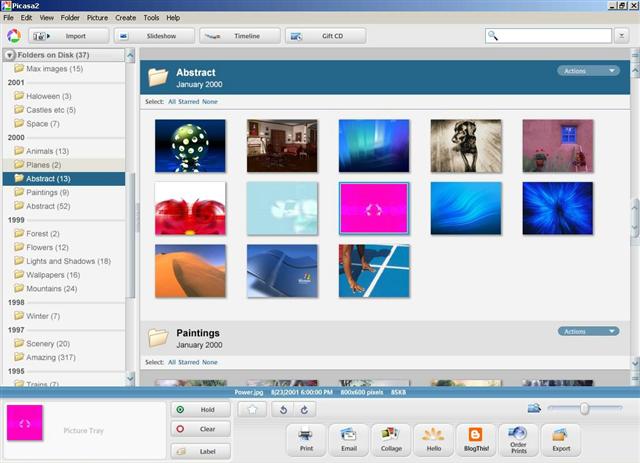
Here are a few photo editing and sharing tools I frequently use. There is Google's Picasa for the basic fixes to the digital photos. Be it cropping, or increasing the contrast, I prefer to use this simple and free software. The interface is quite clean. It also has a good photo album to organize the hundreds of pics on my hard disk. Recently, I found the "Blog This" button quite useful. Now its just the click of a button to upload a pic to my blog!!!

For photo sharing, I have tried different options, the most common being sending photos as email attachments, but somehow, I dont like that way, mostly, if I have a whole album to share with some selected friends.... Thats when I started using Yahoo Photos. Its a quick way to upload your photos at a reduced resolution, and then emailing the link instead to your friends. Then there is the photo sharing option in almost the latest messengers... I have used the Yahoo one, but didnt like it, mainly because, it wasnt suited for my slow Internet connection. I also tried Picasa's Hello... Its quite good, the only problem is the other person needs to have a hello account, and have the hello software installed on his PC too....

FInally, we have the blog to share photos, but thats for all the people on the net to see...

I completely agree with the moto that a picture is worth a thousand words, and thats the reason why almost all my posts are so much full of photos.... Cant help it!!!!! (I tried my best to make an exception in this one though, but cant leave my habit, can I???!!)...